
How to Create a Resume Link for Your Portfolio (2026 Guide)
A portfolio website for resume links is the simplest way to give hiring managers everything they need in one click. Instead of attaching a PDF that might get lost in an inbox, you send a single URL that shows your work, tells your story, and offers a downloadable resume — all on your own terms. This guide walks you through exactly how to build that site, what to include, and how to make sure your resume link actually gets clicked.
Key Takeaways
- A personal portfolio site with a clear resume link makes you easier to hire because recruiters can see your work and your qualifications in one place.
- You don’t need to code — website builders, link-in-bio tools, and even a well-organized LinkedIn profile can serve as a portfolio website for resume links.
- Place your resume link prominently (top navigation, hero button, and footer) and use a descriptive call-to-action like “Download My Resume (PDF).”
- Always export your resume as a text-based PDF — never a scanned image or Word doc — so applicant tracking systems and browsers can read it instantly.
- Track every application you send from your portfolio site with a free Chrome extension so you never miss a follow-up.
| What to Do | Why It Matters | Time |
|---|---|---|
| Choose a single-column, ATS-safe resume template | Modern ATS parse clean PDFs reliably; single-column layouts avoid parsing hiccups | 10 minutes |
| Add a prominent “Resume” link to your portfolio navigation | Recruiters spend under 10 seconds scanning a site — make the resume impossible to miss | 2 minutes |
| Write a short bio that mirrors your resume summary | Consistency between your site and resume builds trust and reinforces your personal brand | 15 minutes |
| Test your resume link on mobile and desktop | Over 60% of job-related browsing happens on phones; a broken or hard-to-tap link costs you interviews | 5 minutes |
| Use a job tracker to log every application sent from your portfolio | You’ll know exactly when to follow up, which version of your resume you used, and what’s still open | 1 minute per application |
Why a Portfolio Website for Resume Links Beats a Plain PDF
Sending a resume as an email attachment is the bare minimum. A portfolio website that includes your resume link does three things a standalone PDF cannot:
- It shows your work in context. A graphic designer can display full case studies next to the resume. A writer can link to published clips. A developer can embed live projects. The resume becomes one piece of a larger, more convincing story.
- It gives you analytics. You can see how many people visited your site, which pages they viewed, and whether they clicked the resume link. That data tells you if your outreach is working.
- It makes you findable. A personal website indexed by Google means a recruiter searching “[your name] portfolio” can land on your site and download your resume without you ever sending an email.
Even if you’re not in a visual field, a simple one-page site with a bio, a few project highlights, and a clear resume link signals that you’re organized and tech-savvy. For roles in marketing, sales, project management, or data science, that alone can set you apart. If you’re applying for a data science position, for example, your portfolio site might host a Jupyter Notebook alongside a resume that’s been optimized with the right keywords — our data scientist resume guide walks you through that.
Modern applicant tracking systems parse clean, text-based PDFs without trouble, but many job seekers still worry about ATS compatibility. For a fact-based look at what really trips up an ATS, read our ATS myths vs. facts in 2026 post — it includes direct quotes from recruiters.
How to Build a Portfolio Website That Includes Your Resume (No Coding)
You don’t need to write HTML. Today’s tools let you build a clean, professional portfolio website in under an hour. Here are the most practical options:
1. Website Builders (Best for Full Control)
- Squarespace, Wix, or Carrd: Drag-and-drop editors with portfolio templates. Carrd is especially good for a single-page site that acts as a digital business card with a resume link.
- WordPress.com: More flexible, with thousands of themes. The free plan includes a subdomain; a custom domain costs about $15/year.
- GitHub Pages (for developers): Free hosting, but requires basic Git knowledge. Perfect if you want to show code repositories alongside your resume.
2. Link-in-Bio Tools (Fastest Setup)
- Linktree, Bio.site, or Bento: These let you create a mobile-optimized landing page with multiple links — one of which is your resume PDF. You can add links to your LinkedIn, projects, and contact form. The downside: limited design control.
3. LinkedIn as a Portfolio Hub
If you’re not ready for a separate site, optimize your LinkedIn profile to function as a portfolio website for resume links. Use the Featured section to upload your resume PDF directly, add links to work samples, and write a summary that matches your resume’s professional summary. Then use your custom LinkedIn URL as the link you share. For help crafting that summary, see our resume summary examples for 20 roles.
Whichever platform you choose, the goal is the same: a single URL you can put on your email signature, social bios, and job applications that leads to both your work and your resume.
How to Create a Simple Resume Link (No Full Website Required)
Not everyone needs a full portfolio site. If you just want a direct, shareable link to your resume PDF, you can create one in minutes using cloud storage. This is the fastest way to get a resume link for email signatures, LinkedIn messages, or application forms that ask for a “resume URL.”
Step-by-step: create a resume link from a PDF
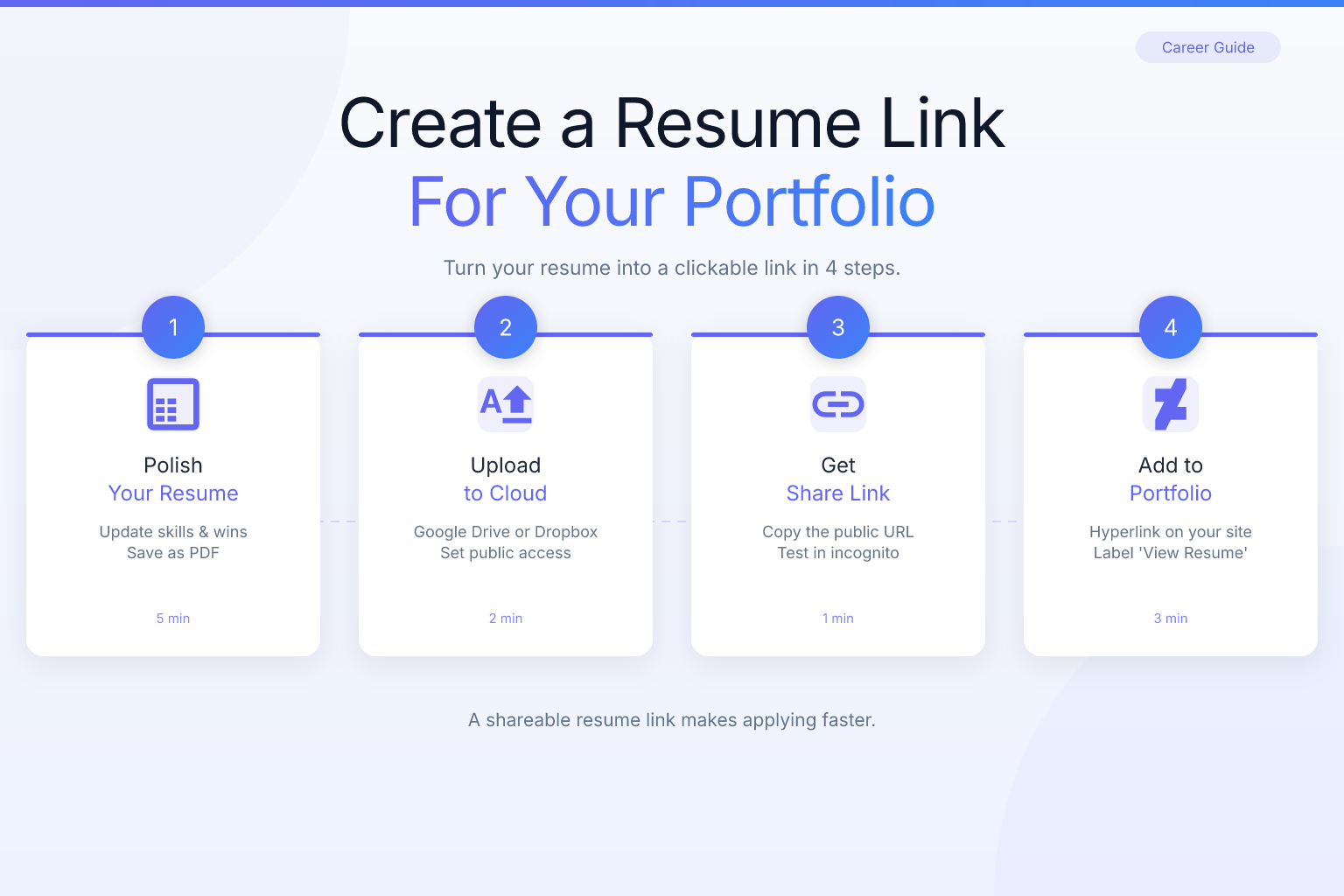
- Export your resume as a text-based PDF. Use a resume builder like ResumeMate’s free tool to generate a clean, ATS-safe PDF.
- Upload the PDF to a cloud service. Google Drive, Dropbox, and OneDrive all work. Google Drive is the most common choice because it’s free and links rarely break.
- Make the file publicly accessible. In Google Drive, right-click the file, choose “Share” > “General access,” and set it to “Anyone with the link.” Make sure the permission is “Viewer,” not “Editor.”
- Copy the shareable link. The link will look something like
https://drive.google.com/file/d/.../view. Test it in an incognito browser window to confirm it opens without a login prompt. - Shorten the link (optional). If the raw link is too long, use a URL shortener like Bitly to create a cleaner version. Be aware that some corporate email filters flag shortened links; a custom domain (e.g.,
yourname.com/resume) is always more professional and trustworthy.
Hosting the PDF on your own website is even better. If you already have a portfolio site, upload the PDF to your site’s server and link to it directly (e.g., yourname.com/resume.pdf). This keeps the link under your control, looks more professional, and avoids any cloud-storage branding.
What to Put on Your Portfolio Website (Beyond the Resume Link)
A portfolio site that’s just a resume download button feels empty. Include these five elements to turn a quick visit into an interview request:
- A short bio (3–4 sentences). State who you are, what you do, and what kind of role you’re looking for. Use the same keywords from your resume so the two reinforce each other.
- 3–5 work samples or case studies. For each, include a title, a brief description of your role, and a visual or link. If you’re not in a visual field, use written project summaries with measurable results. For example, if you’re targeting account executive roles, highlight revenue growth and client wins — our account executive roles & responsibilities guide shows which metrics matter most.
- A downloadable resume (PDF). This is the centerpiece. More on formatting and placement below.
- Contact information or a simple form. Make it easy for a recruiter to reach you without hunting for an email address.
- Links to LinkedIn and GitHub (if relevant). These act as secondary validation of your experience.
If you’re changing careers, a combination resume format can help you bridge the gap between your old industry and your new target role. See our career change resume format guide for a template that puts transferable skills front and center.
For creative roles, your portfolio site is the main event. Our graphic designer resume examples post shows how to pair a visual portfolio with an ATS-safe resume that won’t get rejected by automated systems.
Where to Place Your Resume Link for Maximum Clicks
Placement determines whether anyone actually downloads your resume. Follow this hierarchy:
- Top navigation bar. A link labeled “Resume” or “Download Resume” should be visible without scrolling. It’s the first place a recruiter looks.
- Hero section button. Right below your name and title, add a button that says “Download My Resume (PDF).” This catches visitors who land on your site and want the quickest path to your qualifications.
- Footer. Repeat the link in the footer for visitors who scroll to the bottom after reviewing your work.
- Within project descriptions (optional). If a case study is particularly relevant to a job, you can add a contextual link: “See my full qualifications on my resume.”
- On your resume document itself. Include your portfolio URL in the contact header (e.g., “Portfolio: yourname.com”) so that even if someone only sees the PDF, they can visit your site. Make the URL a clickable hyperlink in the PDF — most resume builders and word processors let you add hyperlinks to text.
Use descriptive anchor text. “Resume” is fine; “Download Resume (PDF)” is better because it sets expectations about the file format and action. Never use vague labels like “Click here” or “My stuff.”
How to Format and Name Your Resume File for a Portfolio Link
The resume you link to must be a PDF — not a Word document, not a Google Doc link, not a scanned image. Here’s why:
- PDFs open instantly in any browser without requiring additional software.
- Text-based PDFs are ATS-friendly. Modern applicant tracking systems (Workday, Greenhouse, Lever) parse clean, single-column PDFs without issues. Problems arise from scanned documents, heavy graphics, or multi-column layouts that confuse older parsers.
- PDFs preserve your formatting across devices, so your carefully chosen fonts and spacing stay intact.
When you build your resume, use a single-column template and export it as a PDF. ResumeMate’s free resume builder does exactly that — you choose a template, fill in your details, and download a clean, ATS-safe PDF ready to link on your portfolio site. If you already have a resume, run it through the resume score checker to see if the formatting and keywords will pass an ATS scan before you upload it.
For font choices that stay readable on screen and in print, refer to our tested guide on the best resume fonts for ATS readability.
The file name matters more than you think. When someone downloads your resume from your portfolio site, the file name becomes the document title in their downloads folder and often the subject line if they forward it. Use this format:
FirstName-LastName-Resume-2026.pdf
Avoid generic names like resume.pdf or final_version3.pdf. A clear file name helps recruiters find your resume later and looks professional. If you’re targeting a specific role, you can add the job title: Jane-Doe-Product-Manager-Resume.pdf. Just make sure the version on your portfolio site is always the most current one.
How to Test Your Portfolio Website and Resume Link
Before you share your site with a single recruiter, run these five checks:
- Click the resume link on your phone. Does the PDF open in the browser or download immediately? If it downloads, make sure the file name is correct and the document is readable on a small screen.
- Send the link to a friend. Ask them to find your resume in under 10 seconds. If they can’t, your placement needs work.
- Check your site speed. A slow-loading portfolio site frustrates visitors. Use Google PageSpeed Insights or a similar tool. Compress images and avoid auto-play videos.
- Verify your PDF is text-based. Open the PDF and try to select text with your cursor. If you can’t, it’s likely a scanned image and will fail ATS parsing. Re-export from your resume builder as a true PDF.
- Update your LinkedIn and email signature. Add your portfolio URL to both so every touchpoint drives traffic to your resume.
Avoid These Mistakes and Integrate Your Portfolio Into Your Job Search
Even a well-designed site can fall flat if you make these errors:
- Linking to a Google Doc instead of a PDF. Google Docs require permissions, load slowly, and look unpolished. Always export to PDF first.
- Using a password-protected or expiring link. Some cloud storage services generate links that expire after a few days. Host the PDF directly on your website or use a permanent hosting solution.
- Forgetting to update the resume. Your portfolio site should always reflect your most recent role and accomplishments. Set a calendar reminder to review it quarterly.
- Overloading the site with too many links. If you give visitors 15 navigation options, they’ll click nothing. Keep the primary focus on your work samples and the resume link.
- Ignoring mobile responsiveness. Test your site on multiple devices. A portfolio that looks great on desktop but breaks on mobile loses half your audience.
Once you’ve avoided those pitfalls, your portfolio site becomes the hub of your job search. Every application, networking email, and LinkedIn message should point back to it. Here’s a simple workflow:
- Find a job posting that matches your skills.
- Tailor your resume for that role using a builder that lets you quickly adjust keywords and highlights.
- Upload the updated PDF to your portfolio site (or swap the file if you use a direct link).
- Apply with a short cover note that includes your portfolio URL.
- Log the application in a job tracker so you know when to follow up.
The ResumeMate Job Tracker is a free Chrome extension that does step 5 automatically — it saves every job you apply to, records the date, and reminds you to follow up. Combined with a portfolio site that hosts your resume, you’ll never lose track of an application or send an outdated resume.
Frequently Asked Questions
Q: How do I create a shareable link for my resume PDF?
A: Upload your resume PDF to a cloud service like Google Drive, Dropbox, or OneDrive. Set the file’s sharing permissions to “Anyone with the link” (viewer access only). Copy the generated link and test it in an incognito window to make sure it opens without a login. For a more professional look, host the PDF on your own website and link directly to it (e.g., yourname.com/resume.pdf).
Q: What does a portfolio URL mean?
A: A portfolio URL is simply the web address of your online portfolio — the link you share with employers so they can view your work samples, bio, and resume. It could be a custom domain (like yourname.com), a subdomain from a website builder, or even a curated LinkedIn profile URL.
Q: How do I add a portfolio link to my resume?
A: Include your portfolio URL in the contact header of your resume, right alongside your phone number and email. For example: “Portfolio: yourname.com.” Make the URL a clickable hyperlink in the PDF so recruiters can open it with one tap. This ensures that even if your resume is forwarded without your cover email, the link to your full portfolio travels with it.
Q: Should I put my full resume on my portfolio website or just a link to download it?
A: Provide a downloadable PDF link rather than pasting the entire resume as a webpage. A PDF preserves formatting, is easier for recruiters to save and share, and ensures the document they see is exactly what you designed. You can include a brief summary of your experience on the site itself, but the full resume should be a separate file.
Q: What’s the best file format for a resume linked on a portfolio site?
A: A text-based PDF. It opens on any device without special software, maintains your layout, and is compatible with applicant tracking systems. Avoid Word documents, Google Doc links, or image-based PDFs that can’t be parsed by ATS software.
Q: Can I use a free website builder for my portfolio and resume link?
A: Yes. Platforms like Carrd, Wix, and WordPress.com offer free plans that are sufficient for a simple portfolio site with a resume link. The key is choosing a clean, mobile-responsive template and using a custom domain if your budget allows (typically $10–$15 per year).
Q: How do I make sure my resume link doesn’t break?
A: Host the PDF file directly on your website’s server or use a reliable cloud storage service with a permanent, public link. Test the link monthly. If you update your resume, keep the same file name and replace the file so the link never changes.
Q: Is a portfolio website necessary if I’m not in a creative field?
A: Not strictly necessary, but it gives you an edge. A simple one-page site with a bio, a few project highlights, and a resume link makes you more memorable than a candidate who only sends a PDF attachment. It also shows initiative and comfort with digital tools — traits valued in almost every industry.
Q: How do I track who visits my portfolio site and downloads my resume?
A: Use a free analytics tool like Google Analytics or the built-in analytics in your website builder. Set up event tracking on the resume download button to see how many clicks it gets. This data helps you understand if your outreach efforts are driving traffic.
Related articles:
Track Every Application While You Job Hunt
Stop losing track of where you’ve applied. The ResumeMate Job Tracker is a free Chrome extension that tracks every application, deadline, and follow-up in one place — right from your browser.
