
How to List Language Proficiency Levels on Your Resume: 2026 Examples & Tips
When you list a skill on your resume, simply naming it isn’t enough — you need to convey your proficiency on resume to help recruiters understand how well you can actually perform that skill. Whether it’s a technical tool, a soft skill, or a foreign language, adding a proficiency level removes guesswork and makes your application more competitive. This guide covers everything from beginner-to-expert scales to language fluency frameworks, plus formatting rules that keep your resume readable by both humans and applicant tracking systems (ATS).
| What to Do | Why It Matters | Time |
|---|---|---|
| Use clear proficiency categories (Beginner, Intermediate, Advanced, Expert) | Recruiters can instantly gauge your depth of experience | 5–10 minutes |
| Match language proficiency to standard scales (ILR, CEFR, ACTFL) | Avoids ambiguity for multilingual roles and global employers | 5 minutes |
| Place skills in a dedicated section with consistent formatting | Improves ATS parsing and makes your resume scannable | 10 minutes |
| Tailor proficiency levels to the job description | Shows you meet the exact skill threshold the employer needs | 15 minutes per application |
What Does Proficiency on a Resume Mean?
Proficiency on a resume is a way of indicating how skilled you are in a particular area — not just that you’ve used something once or twice. It answers the question every hiring manager has: “Can this person do the job at the level we need?” By quantifying your ability, you help both the recruiter and the ATS understand your true capability, not just a keyword match.
For hard skills like programming languages, software, or data analysis, proficiency often reflects years of hands-on use, complexity of projects completed, or certifications earned. For soft skills like leadership or communication, proficiency is harder to quantify, but you can still use descriptive tiers (e.g., “mentored 5 junior team members” vs. “led a 20-person department”). For languages, proficiency is typically tied to standardized scales that measure reading, writing, speaking, and listening.
Without a proficiency indicator, a skill like “Python” could mean anything from “I completed a tutorial” to “I built production machine-learning pipelines.” That ambiguity can cost you an interview. By adding a level, you give the recruiter a clear signal — and you also help ATS software match your resume to the job’s required skill thresholds.
How to List Skill Proficiency Levels (Beginner to Expert)
There’s no universal rule for naming proficiency levels, but most recruiters recognize a simple four-tier system:
- Beginner – You understand fundamentals and can perform basic tasks with guidance.
- Intermediate – You can work independently on standard tasks and troubleshoot common issues.
- Advanced – You handle complex projects, mentor others, and optimize processes.
- Expert – You’re a go-to authority, often contributing to industry standards or training advanced users.
You can also use alternative labels like “Familiar,” “Proficient,” “Highly Proficient,” and “Mastery,” but the four-tier model is the most widely understood. If you prefer a numeric scale, some candidates use years of experience (e.g., “3+ years”) or a 1–5 star rating, though stars can be ambiguous and aren’t always ATS-friendly.
Where to place the level:
- In a dedicated “Skills” section, list the skill followed by the level in parentheses:
Python (Advanced) - In a table or two-column layout, put the skill on the left and the level on the right.
- In your experience bullet points, embed the level naturally: “Developed advanced SQL queries to reduce report generation time by 40%.”
Example skills section with proficiency:
Technical Skills
- Python (Advanced)
- SQL (Intermediate)
- Tableau (Advanced)
- Machine Learning (Beginner)
If you’re using a resume builder, choose a template that keeps the skills section clean and single-column — that’s the safest format for ATS parsing. The ResumeMate free resume builder offers several ATS-friendly templates where you can easily add proficiency labels without breaking the layout.
For role-specific inspiration, see how an accountant might list “GAAP (Advanced)” or “QuickBooks (Intermediate)” in our accountant resume examples, or how an architect showcases “AutoCAD (Expert)” and “Revit (Advanced)” in our architect resume guide.
Language Proficiency on a Resume: Scales and Examples
Language skills are a special case because employers often need to know exactly how fluent you are in reading, writing, speaking, and listening. Instead of vague terms like “conversational” or “fluent,” use a recognized proficiency scale. The three most common are:
- ILR (Interagency Language Roundtable) – Used by U.S. government agencies. Scale: 0 (No Proficiency) to 5 (Native/Bilingual).
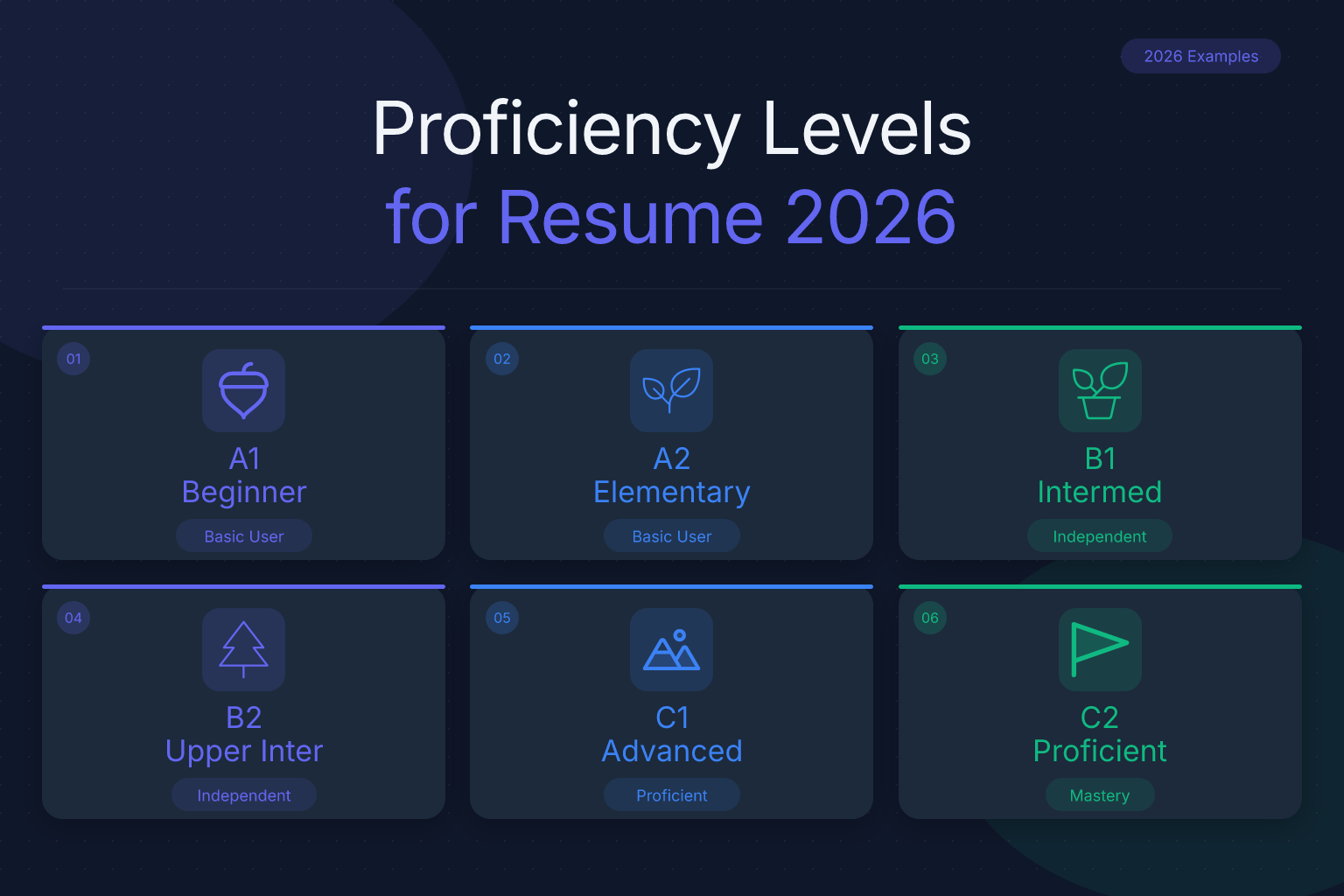
- CEFR (Common European Framework of Reference) – Widely used in Europe and international companies. Scale: A1 (Beginner) to C2 (Mastery).
- ACTFL (American Council on the Teaching of Foreign Languages) – Common in U.S. academia. Scale: Novice, Intermediate, Advanced, Superior, Distinguished.
How to list language proficiency:
Languages
- Spanish – CEFR B2 (Intermediate)
- French – ILR 2+ (Limited Working Proficiency)
- Mandarin – ACTFL Advanced Low
If the job posting doesn’t specify a scale, CEFR is a safe default because it’s globally recognized. You can also add a brief parenthetical explanation: German – B2 (can handle business meetings and technical discussions).
Mapping Informal Terms to Standard Scales
Many candidates use everyday labels like “conversational,” “professional working,” or “native/bilingual.” While these are common, they lack precision. Here’s how they typically align with the major scales:
| Informal Term | CEFR Level | ILR Level | ACTFL Level |
|---|---|---|---|
| Elementary / Basic | A1–A2 | 0+–1 | Novice Low–Mid |
| Conversational / Limited Working | B1 | 1+–2 | Intermediate Low–Mid |
| Professional Working | B2 | 2+–3 | Intermediate High–Advanced Low |
| Full Professional / Advanced | C1 | 3+–4 | Advanced Mid–High |
| Native / Bilingual | C2 | 4+–5 | Superior–Distinguished |
If you’ve previously used “conversational” on your resume, replace it with the corresponding scale level (e.g., “Spanish – CEFR B1”) to give recruiters a clear benchmark. For “advanced English,” that typically means CEFR C1 or ILR 4 — the ability to handle complex professional communication, nuanced texts, and high-stakes discussions without strain.
How to Rank Your Language Proficiency
If you’re unsure how to rank your language skills, follow these steps:
- Self-assess honestly using free online CEFR self-assessment grids that describe what you can do in reading, writing, speaking, and listening at each level.
- Choose the lowest skill as your overall level if you’re listing a single proficiency. For example, if your reading is B2 but speaking is B1, list B1 to avoid overpromising.
- Break out skills if the job requires it — some roles care more about speaking than writing. You can write: “Spanish – CEFR B2 (reading/writing B2, speaking B1).”
- Validate with a test if possible (e.g., TOEFL, IELTS, DELE, DELF) and include the score or certificate in your certifications section.
This approach directly answers the common question “how to rank language proficiency on resume” and ensures your self-rating is defensible in an interview.
What does “proficient” mean for languages? On most scales, “proficient” corresponds to a level where you can function independently in professional settings — typically CEFR B2/C1 or ILR 3/3+. If you’re a native speaker, write “Native” rather than “Expert” to avoid confusion.
What is better than proficient on a resume? For skills, “Expert” or “Mastery” is the next step above proficient. For languages, “Native” or “Bilingual” is the highest designation. Avoid inflating your level — if you claim “Expert” but can’t answer deep technical questions in an interview, it damages your credibility.
Where to Put Proficiency Information on Your Resume
Proficiency details can appear in several sections, depending on the skill type:
- Dedicated Skills section – Best for hard skills, tools, and technologies. List each skill with its level.
- Languages section – If you speak multiple languages, create a separate “Languages” section near the bottom of your resume, or integrate it into Skills if you only have one or two.
- Certifications section – Certifications often imply a proficiency level. For example, “AWS Solutions Architect – Professional” signals advanced cloud skills. Link to our guide on listing certifications and licenses on a resume for placement tips.
- Experience bullet points – Demonstrate proficiency through accomplishments: “Used advanced Excel (pivot tables, VBA macros) to automate monthly reporting, saving 10 hours per week.”
- Education section – Relevant coursework or degrees can indicate proficiency, especially for entry-level candidates. See what to include in your education section by experience level.
- Projects section – For students or career changers, a projects section is a powerful way to prove proficiency with concrete examples.
Avoid scattering proficiency indicators randomly. Keep them in one or two predictable places so both recruiters and ATS can find them quickly.
Formatting Skills for ATS and Readability
ATS software scans your resume for keywords and sometimes parses skill-level pairs. To make sure your proficiency data isn’t lost:
- Use consistent punctuation. If you write
Python (Advanced)for one skill, don’t switch toPython: Advancedfor another. Consistency helps ATS map the pattern. - Avoid graphics and icons. Stars, progress bars, or circular skill meters often get garbled or ignored by ATS. Stick to text-based levels.
- Capitalize proper nouns correctly. Skill names that are proper nouns (brands, software, programming languages) should be capitalized:
Adobe Photoshop,Java,Google Analytics. Generic skills likeproject managementordata analysisare lowercase unless they start a bullet point. This answers the common question “should skills on resume be capitalized” — yes for proper nouns, no for general concepts. - Use a single-column layout for the skills section. Multi-column designs can confuse older ATS, though modern systems handle them better. When in doubt, a single-column list is the safest choice.
- Don’t bury proficiency in paragraphs. If you mention a skill in a bullet point, make the level obvious: “Led a team of 12 using advanced Jira workflows” rather than “Used Jira.”
For more on avoiding ATS pitfalls, see our guide on ATS formatting mistakes that kill your resume. And if you’re building a new resume, choose a template from our list of ATS-friendly resume templates to ensure your skills section parses correctly.
After you’ve built your skills section, run your resume through a free ATS score checker to see if the proficiency labels are being parsed correctly. ResumeMate’s score checker gives you section-by-section feedback, including whether your skills are detected and matched to the job description.
Common Mistakes When Showing Proficiency
Even well-intentioned candidates make errors that weaken their resume. Avoid these:
- Using only one level for all skills. If every skill is “Advanced,” it looks inflated. Be honest — it’s okay to have a mix.
- Listing too many beginner-level skills. A long list of tools you barely know dilutes your core strengths. Focus on skills where you’re at least intermediate, unless the job specifically asks for exposure to a tool.
- Omitting proficiency entirely. A bare list of skills forces the recruiter to guess. Always add a level, even if it’s just “Proficient” or “Familiar.”
- Using ambiguous terms. “Conversational” Spanish could mean you can order food or negotiate a contract. Use a scale instead.
- Forgetting to update proficiency as you grow. If you’ve been using a tool daily for two years, you’re no longer a beginner. Revisit your resume every six months.
- Placing proficiency in the summary but not the skills section. Consistency matters. If your summary says “expert in Python,” your skills section should also show Python (Expert).
How to Prove Proficiency Without Overstating It
Stating a level is one thing; backing it up is another. Recruiters will test your claims in interviews, so your resume should already contain evidence.
- Use metrics in experience bullets. “Intermediate SQL” becomes credible when followed by “Wrote 50+ complex queries joining 10+ tables for financial reporting.”
- Add certifications. A certification is a third-party validation of proficiency. For example, a PMP certifies advanced project management skills. See our guide on where to put certifications on a resume.
- Include a link to a portfolio or GitHub. For technical skills, a repository with real projects shows your level more accurately than any label.
- Mention the context of use. “Advanced Excel in a financial modeling context” is more specific than just “Advanced Excel.”
- Be ready to downgrade if you’re unsure. If you’re between Intermediate and Advanced, list Intermediate. It’s better to impress in an interview than to be exposed as overconfident.
Using ResumeMate to Build a Proficiency-Focused Resume
Building a resume that clearly communicates proficiency doesn’t have to be time-consuming. ResumeMate’s free tools help you get it right, from initial creation to final ATS check. Here’s how each tool supports your proficiency strategy:
AI Resume Builder – Choose an ATS-friendly template and add a dedicated skills section. The builder lets you type proficiency levels directly into each skill field, ensuring consistent formatting like
Python (Advanced)across all entries. It also suggests relevant skills based on your target job title, helping you decide which proficiencies to highlight. Once you’ve filled in your levels, the builder exports a clean, single-column PDF that ATS systems parse reliably. Try the free resume builder.Resume Score Checker – After you’ve built your resume, upload it to the score checker. It scans for keywords and evaluates whether your skill-level pairs are detected correctly. If you’ve used inconsistent labels (e.g., mixing “Advanced” and “Expert” for the same skill), the checker flags it. It also compares your proficiency levels against the job description to see if you meet the required thresholds. This instant feedback helps you fine-tune your resume before sending it out. Check your resume’s ATS score free.
Job Tracker Extension – Once your proficiency-focused resume is ready, use the Chrome extension to track every application, deadline, and follow-up. It keeps a log of where you’ve applied, so you can tailor proficiency levels for each role without losing track of your submissions. (More on that at the end.)
By combining these tools, you can build a resume that not only lists your skills but proves your proficiency with clarity and consistency — giving you a competitive edge in any job market.
FAQ
Q: What skills should I put on my resume?
A: List skills that are directly relevant to the job you’re targeting. Start with hard skills (tools, software, technical abilities) mentioned in the job description, then add transferable soft skills like communication or leadership if you have strong examples. Avoid generic filler like “Microsoft Word” unless the role specifically requires it.
Q: What does “proficient” mean on a resume?
A: Proficient generally means you can perform the skill independently in a professional setting without close supervision. It’s a step above beginner and a step below expert. For languages, proficient often aligns with CEFR B2/C1 or ILR 3 — the ability to handle business conversations and written communication.
Q: How do you describe language proficiency on a resume?
A: Use a standardized scale like CEFR (A1–C2), ILR (0–5), or ACTFL (Novice–Distinguished). List the language, the scale abbreviation, and your level: Japanese – CEFR B1. If the job doesn’t specify a scale, CEFR is the safest choice. Avoid vague terms like “fluent” or “conversational.”
Q: What is better than “proficient” on a resume?
A: For hard and soft skills, “Advanced” or “Expert” indicates a higher level than proficient. For languages, “Native” or “Bilingual” is the top tier. Use these only if you can back them up with evidence like years of experience, certifications, or native-level fluency.
Q: Should skills on a resume be capitalized?
A: Capitalize proper nouns — names of software, programming languages, brands, and certifications (e.g., Python, Salesforce, PMP). Generic skills like project management or data analysis are lowercase unless they start a sentence or bullet point. Consistency matters: if you capitalize one proper noun, capitalize all of them.
Q: What special skills should I list on a resume?
A: Special skills are those that set you apart from other candidates — niche software, rare languages, or unique technical abilities. List them only if they’re relevant to the job. For example, “COBOL programming” is a special skill for legacy systems roles, but irrelevant for a front-end developer position. Always include a proficiency level.
Q: How do I know if my proficiency levels are accurate?
A: Compare yourself against objective benchmarks: job requirements, certification exam standards, or feedback from colleagues. If you’ve used a skill daily for two years in a professional setting, you’re likely at least Intermediate. If you’ve trained others or led complex projects, you’re Advanced. When in doubt, choose the lower level — you can always demonstrate higher proficiency in the interview.
Q: Is proficient better than advanced?
A: No, advanced is a higher level than proficient. In most skill-level scales, proficient means you can work independently, while advanced indicates deeper expertise, the ability to handle complex tasks, and often the capacity to mentor others. For languages, “proficient” typically aligns with CEFR B2/C1, while “advanced” is closer to C1/C2. Always use the level that accurately reflects your ability.
Q: What is advanced working proficiency?
A: Advanced working proficiency is a term from the ILR scale (level 3/3+) describing someone who can handle professional conversations, understand complex texts, and communicate effectively in the workplace, though they may still have an accent or occasional errors. It’s roughly equivalent to CEFR C1. If a job requires “advanced working proficiency,” you should be able to conduct business in that language without major difficulty.
Q: How do I show language fluency levels on my resume?
A: List each language with its proficiency level using a recognized scale like CEFR, ILR, or ACTFL. For example: Spanish – CEFR B2 or French – ILR 3. Place this in a dedicated “Languages” section or within your skills section. Avoid vague terms like “fluent” or “conversational” — they don’t give recruiters a clear benchmark.
Q: What are the levels of language proficiency for a resume?
A: The most common scales are CEFR (A1–C2), ILR (0–5), and ACTFL (Novice–Distinguished). For resumes, you can use the scale’s level codes (e.g., B2, 3, Advanced High) or descriptive terms like “Intermediate” or “Advanced,” but always pair them with the scale name to avoid ambiguity. Choose the scale that’s most recognized in your industry or region.
Q: What does moderately proficient mean?
A: “Moderately proficient” is an informal term that usually corresponds to an intermediate level — you can handle routine tasks and basic communication but may struggle with complex or technical discussions. On a resume, it’s better to use a standardized level like “Intermediate” or “B1” rather than vague phrases.
Q: What is full working proficiency in English?
A: Full working proficiency means you can use English effectively in a professional environment — participating in meetings, writing reports, and understanding nuanced communication. On the ILR scale, this is level 4 (Full Professional Proficiency); on CEFR, it’s C1. If you have this level, you can confidently list “English – CEFR C1” or “English – Full Professional Proficiency.”
Q: What are the degrees of language fluency?
A: Language fluency is often described in degrees from beginner to native. Common degrees include: No Proficiency, Elementary, Limited Working, Professional Working, Full Professional, and Native/Bilingual. These align with ILR levels 0–5. For resumes, it’s best to use the scale’s labels or codes rather than generic terms like “conversational.”
Q: What does “advanced English” mean on a resume?
A: “Advanced English” typically means you can handle professional communication, complex texts, and nuanced discussions without strain. It corresponds to CEFR C1 or ILR 4. To avoid ambiguity, always pair the term with a scale: “English – CEFR C1 (Advanced).” This gives recruiters a precise benchmark and answers the common query “advanced english in resume meaning.”
Q: What is the difference between conversational, professional, and native/bilingual language levels?
A: Conversational (CEFR B1, ILR 1+–2) means you can handle everyday social situations but may struggle with technical discussions. Professional working (CEFR B2, ILR 2+–3) means you can function independently in a workplace setting. Native/bilingual (CEFR C2, ILR 5) means you have complete fluency, including cultural nuances. On a resume, replace these informal terms with the corresponding scale level to give recruiters a clear, comparable measure.
Q: What does “intermediate” mean on a resume?
A: Intermediate means you can work independently on standard tasks and troubleshoot common issues, but you may need guidance for complex or novel problems. It’s the level between beginner and advanced. For languages, intermediate aligns with CEFR B1 or ILR 2 — you can handle routine conversations and simple written communication. Always pair “intermediate” with a scale if it’s a language skill.
Q: How do I rank my language proficiency on a resume?
A: Start by self-assessing using a CEFR self-assessment grid, then choose the level that matches your weakest skill (reading, writing, speaking, or listening) as your overall proficiency. If the job emphasizes a specific skill, you can break it out: “Spanish – CEFR B2 (reading/writing B2, speaking B1).” Validate with a test score if possible, and always use a recognized scale to avoid ambiguity.
Q: What are the language levels for a CV?
A: The language levels for a CV are the same as for a resume: use CEFR (A1–C2), ILR (0–5), or ACTFL (Novice–Distinguished). In Europe and many international contexts, CEFR is the standard. List each language with its level code and, optionally, a brief descriptor: “French – CEFR B2 (Professional Working).” This answers queries like “language level cv,” “language levels cv,” and “language levels for cv.”
Track Every Application While You Job Hunt
Stop losing track of where you’ve applied. The ResumeMate Job Tracker is a free Chrome extension that tracks every application, deadline, and follow-up in one place — right from your browser.
